

YouTube tags help videos get discovered by showing the platform what your content is about. Using the right tags can improve search rankings and recommendations.
With Vidzuo’s YouTube Tag Extractor, you can instantly see all tags from any public video. It’s fast, simple, and doesn’t require any technical knowledge.
Just copy the video link, paste it into Vidzuo, and the tool will fetch all the tags. You can then copy them or save them for your own videos.
Analyzing tags helps you find trending keywords, get content ideas, and optimize your own videos for better visibility. Using relevant tags along with a strong title and description makes your videos more likely to reach the right audience.
Vidzuo makes this process effortless, letting you focus on creating content while still improving your video strategy.
Why YouTube Tags Are Important
YouTube tags help the platform understand the content of your video. They guide the algorithm in showing your video to viewers who are interested in similar topics.
Tags improve search visibility, making it easier for your video to appear in relevant search results. They also increase the chance of your video appearing in recommended videos.
Analyzing tags from successful videos can give you insight into trending topics and popular keywords. This helps you create content that attracts the right audience.
Using relevant tags alongside a strong title, description, and thumbnail can boost your video’s performance. Tags alone won’t guarantee success, but they make a noticeable difference in discoverability.
YouTube Tag Extractor Preview
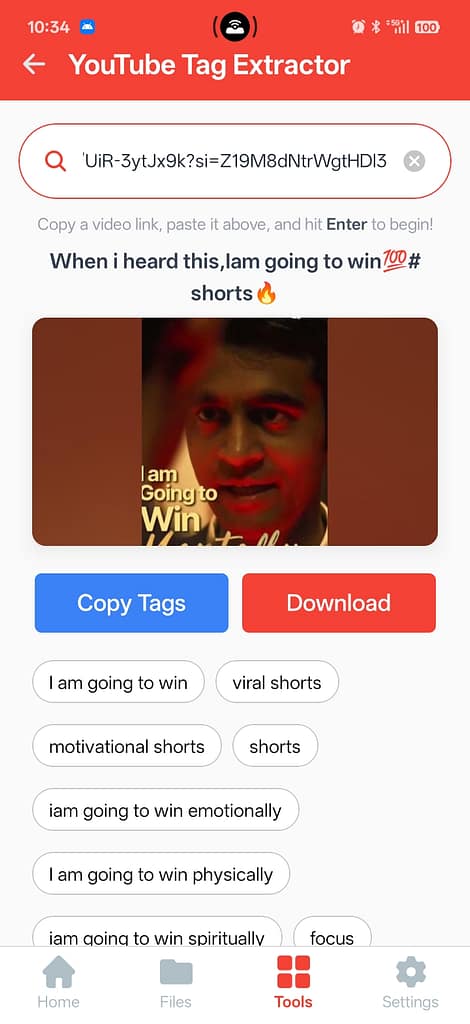
Vidzuo’s Tag Extractor shows all the tags of any public YouTube video in one clean, easy-to-read view. You can see exactly what tags the video uses before copying them.
The preview is high-quality and organized, making it simple to identify the most relevant tags. This way, you don’t have to guess or manually search through a video’s metadata.
With the preview, you can quickly select the tags you want to use for your own videos, saving time and helping you plan your content strategy more effectively.
How to Extract YouTube Tags Using Vidzuo
Start by copying the YouTube video link you want to analyze. Then open Vidzuo, go to Tools → YouTube Tag Extractor, and paste the link into the input box.
Vidzuo fetches all the tags instantly. Once loaded, you can copy them directly or download them for later use. It’s fast, reliable, and requires no technical knowledge.
This simple process makes it easy to analyze any public video and gather the exact keywords used to reach a wider audience.
Tips for Using YouTube Tags Effectively
Focus on tags that are relevant to your video content. Irrelevant tags can confuse the algorithm and reduce your video’s performance.
Combine broad and specific tags to reach both a wide audience and viewers searching for niche content. This helps your video show up in more search results.
Use tags alongside a strong title, engaging description, and eye-catching thumbnail. The combination of all these factors improves your video’s visibility and overall performance.
To give your video the best chance of reaching more people, make sure you’re using the right mix of tags, a strong title, a clear description, and a thumbnail that grabs attention.
And if you ever need help getting that perfect thumbnail, Vidzuo’s Thumbnail Extractor Tool makes it super easy to extract high-quality thumbnails from any video. It’s quick, simple, and a great way to level up your content.
