
If you’ve ever come across a video with an eye-catching thumbnail and wished you could save it, you’re not alone. Whether you’re a content creator, designer, student, or someone who just loves collecting visuals for inspiration, having a simple way to download YouTube and social media thumbnails in HD can make your workflow a lot easier.
That’s exactly where Vidzuo’s Thumbnail Extractor comes in. It’s a clean, fast, and user-friendly tool designed to help you grab high-quality thumbnails from almost any platform in just a few seconds.
Why Do People Download Thumbnails?
Thumbnails are more than just pretty pictures — they are a powerful storytelling tool. A good thumbnail can instantly communicate the emotion, mood, or message of a video. Many users download thumbnails for reasons like:
- Learning thumbnail design by studying top creators
- Creating YouTube templates or mockups
- Using thumbnails in school projects or presentations
- Making edits, memes, or reaction content
- Saving creative ideas for future video projects
- Analyzing competitor content for marketing or SEO research
Thumbnail Extractor Action (Preview Screenshot)
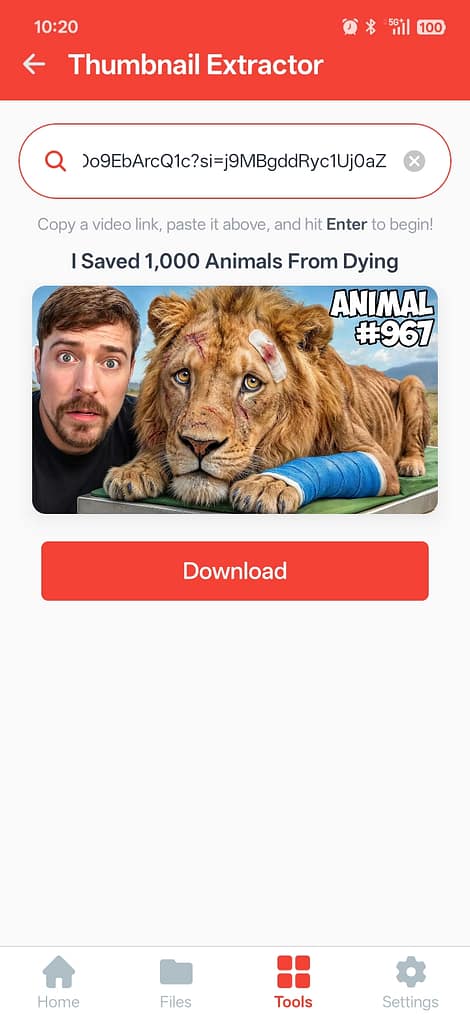
Here’s a quick look at Vidzuo’s Thumbnail Extractor in action. When you paste a YouTube or social media link, the thumbnail appears instantly in high quality. You can see exactly how it looks before downloading, so you know it’s the one you want.
The Download button is right below the preview, making it easy to save with just one click. Everything is simple, clear, and right there on the screen, so grabbing thumbnails is fast and hassle-free.
How to Download Thumbnails from YouTube
Downloading thumbnails with Vidzuo is really straightforward. Just grab the video link, paste it inside Vidzuo, and tap the download button. That’s literally all you need to do. You can finish the whole process in just a few simple steps.
1. Copy the YouTube Video Link
Open YouTube and find the video whose thumbnail you want.
Click on Share → Copy Link.
2. Paste the Link Inside Vidzuo
Open Vidzuo, go to Tools → Thumbnail Extractor, and paste the YouTube link into the input box.
As soon as you paste the link, Vidzuo automatically starts fetching the video’s thumbnail in the best possible quality.
3. Download the Thumbnail
Once the thumbnail loads, tap the Download button below it.
The image will be saved instantly to your device, and you can find it later in:
File Manager → Download → Vidzuo
Vidzuo saves all extracted thumbnails in one place so you never lose track. You can also access it inside Vidzuo’s built-in file manager.
How to Download Thumbnails from Social Media (Instagram, Facebook, X, etc.)
Vidzuo isn’t limited to YouTube — you can use it to download thumbnails from many other social platforms too. The steps are pretty much the same, but here’s a simple guide to make everything even easier for you:
1. Copy the Link from the Social Media App
Go to the post or video on Instagram, Facebook, Vimeo, Twitter (X), or any supported platform.
Tap the Share icon and select Copy Link.
2. Open Vidzuo’s Thumbnail Extractor
Launch Vidzuo, head to Tools → Thumbnail Extractor, and paste the copied link.
Vidzuo automatically detects the platform and fetches the thumbnail in HD.
3. Download the Thumbnail
After the preview loads, tap the Download button.
Your thumbnail will be saved to:
Downloads → Vidzuo
You can also view and manage it directly inside Vidzuo’s file manager.
How Vidzuo Makes Thumbnail Downloading Easier Than Other Tools
Vidzuo is built with a security-first mindset, and everything you do is processed directly on your own device — not on any external server.
Because everything runs locally in your browser, Vidzuo uses your device’s full hardware performance, making the process faster and smoother.
The tool always delivers the highest-quality thumbnails with zero compression, giving you the exact original resolution uploaded by the creator.
And as promised, Vidzuo will remain 100% free forever, with no paid plans, no extra charges, and no hidden limits.
Tips for Using Thumbnails the Right Way
Thumbnails are super useful, but it’s important to use them responsibly. Remember, these images belong to the original creators, so don’t reuse them for commercial purposes without permission.
A great way to use them is for learning and inspiration. Study thumbnails to understand what makes people click, get ideas for your own content, or use them for research and education.
If you’re creating YouTube videos, don’t just copy — analyze. Look at the colors, layout, and text styles to see what works. Then, combine those ideas to design your own unique thumbnails.
And if you really want to take your content to the next level, check out Vidzuo’s YouTube Tag Extractor. It helps you discover the tags top videos are using, so you can understand SEO trends and make your videos more discoverable.
Good thumbnail design and smart tagging are skills you can learn by observing others — and tools like Vidzuo make that process fast, easy, and completely free.
